ShareThis

Showing posts with label social media. Show all posts

Sunday, July 12, 2015

Get Started with Social Selling

Social Selling
What's the one number you need to know about social media and social networking? 25.

25% of time spent on the internet today is spent on social media.

Nearly 25% of Americans use social networking sites several times per day.

And more than 25% of the people in the world have a social media account. THE WORLD.

So why aren't you trying to use social media to generate leads and nurture prospects? Because, obviously, you should be. Businesses everywhere, from small firms to multinational corporations are using social media for marketing, advertising and brand awareness. But some salespeople have been slow to adopt for direct sales purposes. Understandably, it can be a bit overwhelming. Especially for someone unfamiliar with social media. But it's really just another way to communicate -- just like email (and the telephone before that). So here are some tips to help you get started with social selling:

Get Started with Social Selling by:
  1. Create (and use) professional social media profiles on Twitter and LinkedIn.
  2. Optimize social media profiles.
  3. Seek referrals on LinkedIn by giving recommendations & endorsing others.
  4. Follow at least 100 new people (20x per day) on Twitter including:
    • Industry Thought Leaders
    • Prospects
    • Customers 
    • Sales Gurus
    • Set up Google Alerts for competitors/prospects/customers/industry terms.
    • Post at least 3x per week about:
      • Industry News
      • Prospects/Customers
      • Competitors
      • Thought Leaders
      • Photos when Travelling
      • Sales Best Practices
      • Personal Interests (20% of time is okay)
    • Join industry-specific groups on LinkedIn.
    • Add LinkedIn connector to Outlook on laptop.
    • Download LinkedIn Connected app for mobile phone.
    • Connect Salesforce account to Twitter.
    • Subscribe to industry and thought leadership blogs.
    • Subscribe to LinkedIn Sales Navigator (optional).
    • Blog (optional).

    New Business Sales Daily Social Selling Routine Checklist:
    1. Open LinkedIn and Twitter in browser tab (don’t close – just like email).
    2. Find content to share.
    3. Share general content on social networks.
    4. Share specific content with prospects & customers on Twitter & LinkedIn (just like you would via email).
    5. Look at who liked, retweeted, favorited or commented on your posts on LinkedIn & Twitter.
    6. Review LinkedIn alerts.
    7. Check on who’s viewed your LinkedIn profile.
    8. Send personalized connection request to any prospects who looked at your LinkedIn profile.
    9. Send personalized connection requests to any prospects you emailed thru Outlook yesterday.
    10. Send personalized connection requests to people who engaged with your LinkedIn posts.
    11. Follow people who engaged with your tweets.
    12. Follow people who followed you on Twitter.
    13. Respond to messages (just like you would email).

    Top Prospect Weekly Social Selling Routine Checklist:
    1. Open LinkedIn and Twitter in browser tab (don’t close – just like email).
    2. Find content specifically for/about top prospects.
    3. Share content specifically with top prospect (via email and social media).
    4. Like and Retweet posts from top prospects.

    Social Retention/Growth Weekly Routine Checklist:
    1. Open LinkedIn and Twitter in browser tab (don’t close – just like email).
    2. Find content specifically for/about current customers.
    3. Share content specifically with current customers (via email and social media).
    4. Like and Retweet posts from current customers.

    Have other tips for salespeople looking to use social media to start selling? Leave them in the comments below:

    Sunday, September 28, 2014

    Ten tips for better LinkedIn profile headlines

    Image Source: Studenthacks.org
    Please don't be the guy (or girl) with the generic auto "Title at Company Name" profile headline on LinkedIn. Even if you're not a marketer, but especially if you aren't currently employed, you need to use this valuable space to tell people exactly what it is that you do. It's not only important so that you show up in search results, but it will also make people click on your profile when there's a long list of people similar to you.

    It only takes a minute, so please just go update it today and follow these ten tips:

    1. Establish yourself as an expert in something
    2. Explain why someone should connect with you
    3. Use stats & numbers if possible
    4. Utilize as many industry buzzwords as possible
    5. Start with a short question
    6. Use examples of proven results
    7. Differentiate yourself from everyone else in your function/industry
    8. Use V-bars (|) to separate sections
    9. If you're C-level say so
    10. If you're a jobseeker say so
    Got any other tips? Or examples of some good headlines? Share them in the comments below:

    Friday, April 25, 2014

    Facebook, Twitter and Google+ cover photo sizes


    You may have noticed my new cover photo (see above).

    Well Twitter just announced its new profile page redesign, including a new "Cover Photo" feature that's their attempt to catch up with what their two main competitors -- Facebook and Google+ -- have already done.

    Originally posted on September 18, 2012. Updated on April 25, 2014: Twitter redesigned their profiles again with new, larger cover photo images = 1,500 pixels by 500 pixels.

    It's a way for people to express themselves beyond their profile picture and bio. But its also one of my favorite new universal features amongst social networks. Why? Because it allows users to upload a profile picture of just their face (which, by definition, is what a profile picture should be) and now use the cover photo for pictures of their dog, baby, significant other, favorite athlete, actor, team, etc.

    But unfortunately, it's not that simple. While most profile pictures today are a standard square:
    • Facebook: 128px by 128px
    • Twitter: 400px by 400px
    • Google+: 252px by 252px
    ...each of these social networks have different size constraints for their cover photos:
    • Facebook: 851 pixels wide by 315 pixels tall (or 3404px by 1260px)
    • Twitter: 1,500 pixels wide by 500 pixels tall (or 3756px by 1878px)
    • Google+: 480 pixels wide by 270 pixels tall (or 3840px by 2160px)
    So please, change your profile picture to an image of yourself, by yourself, and then take advantage of this new social network feature. But if you want to create a cover photo that meets each site's recommendations, you'll have to have 3 different images or at least 3 different crops of your image for each.

    Wednesday, February 19, 2014

    An image is worth 1000 retweets

    An image is worth a thousand retweets.


    The old adage "a picture is worth a thousand words" was long attributed to Confucius as a Chinese proverb, but the expression was actually first used in a 1911 newspaper article discussing journalism and publicity.

    The exact phrase first appears in an 1918 newspaper advertisement for the San Antonio Light which says:

    One of the Nation's Greatest Editors Says:
    One Picture is Worth a Thousand Words
    The San Antonio Light's Pictorial Magazine of the War
    Exemplifies the truth of the above statement—judging from the warm
    reception it has received at the hands of the Sunday Light readers

    Today, the phrase is a full blown cliche, forbad by journalists and newspapers around the world. But with the popularity of social media and its ever-growing reach, the context of the phrase now takes new meaning.

    Today, with the constant stream of posts, blogs, and tweets, it can be difficult to differentiate and emerge from the masses. But one simple way to draw the eye to your posts, and to your account, is with images.

    If the objective of every social media account is to gain followers, and the intention of every post is to promote engagement, then the best (and easiest) way to attain your goals is by adding a photo, picture, or image to everything you do. But don't just add a profile picture and cover photo (which you should definitely be doing), you should also add an image to every tweet, every blog post, and every Facebook update. You'll see your likes, favorites and retweets increase almost immediately. And before you know it, every image will be worth a thousand retweets. 

    Saturday, November 16, 2013

    6 simple tips for social media


    At a high level, social media seems very simple. Post this, follow her, retweet that, connect with him. But after you dive in, it can be a struggle to stay afloat. You quickly realize that it can be much more complicated than those simple one-click actions. It doesn't have to be.

    Here are six simple tips to help you gain more followers and get more likes:

    Adopt early: One of the easiest ways to gain popularity on any social media platform is to be an early adopter. Those who join early not only learn the ropes faster, but can also take advantage of the domino effect of all the other people who join from that day forward. Each person that joins a new network immediately follows every one of their friends who are already on that network. If you're not on that list, they may never look for you again.

    Follow friends: You should not only follow all of your friends from day one, but also occasionally check to see if any new friends have joined. Some platforms are great about this (Facebook, Instagram, Pinterest), sending you notifications any time your friend from Facebook joins. But others take a little more effort. Check your settings or search tools until you find a "Search My Contacts" button or similar link. Most of your friends will follow back, they likely just didn't realize your account existed.

    Follow back: The number one rule you'll hear the most when attending networking seminars, reading social media books, or watching a live webinar about social networks is "Follow Back!" It's something I'm not crazy about (for other reasons), but it truly is the quickest and easiest way to gain the most followers and increase interactions with your posts.

    Post once per day: Unless you already have over 2,000 followers, friends, and/or connections I'd advise against posting any more than once per day. Spamming people's timelines and feeds with your opinions and stories is the fastest way to get unfollowed, unfriended, deleted, and blocked. If you have more than one post in mind, save it as draft or schedule it go live the following day.

    Update profile: When someone finally does find you on any social network, the first thing they will do is read your profile. Keep it short, simple, and creative. But also make it descriptive. No matter how eccentric you are in real-life, your profile should be direct and to the point.

    Add profile picture: I lied, the first thing they will do is look at your profile picture. Many times, they won't even make it to your profile because they didn't even realize it was you. If you want people to follow you, replace that Twitter egg with a headshot. Don't have a professional photo? Fine. Just upload anything for now. You can worry about putting your best face forward later.


    I know a lot of my readers are also social media gurus and social networking ninjas, so please feel free to post your other tips in the comments section as well:

    Sunday, November 3, 2013

    Ten reasons to not follow back


    Every social media ninja and social networking jedi says the same thing, "Follow Back!" I disagree. Here are ten reasons why:
    1. First, just because everyone else is doing it doesn't mean you should. If Johnny jumped... well, you get the point.
    2. Second, it is okay to follow back, just do not do so blindly. Read their profile and last 3 tweets to see if you have anything in common.
    3. Just because someone is following you doesn't mean you have the same interests. 
    4. There are people out there who follow-unfollow just to gain followers -- so you could end up following people who actually aren't following you back.
    5. You can't legitimately interact with your audience if your timelines and feeds are flooded with thousands of new posts every minute.
    6. Social network influence algorithms like Klout's take your ratio of follows to followers into account when calculating your score -- having more followers than people you follow will improve your score.
    7. Most social media gurus follow a lot less people than they have followers -- so they're not even following their own advice.
    8. The only way to know if someone is worth following is by seeing the number of followers they have (the most interesting people have the most followers), so if we all followed back how would we know who to follow to begin with?
    9. If everyone everywhere followed everyone back what would be the point? The greatest thing about social media is being able to create niche social networks with those of similar interests.
    10. And lastly, by not following back, you're doing your part to put an end to this endless cycle. We have to start somewhere.
    Can you think of any other good reasons not to follow back (I struggled with the last 2 if you couldn't tell)? If so, add them to the comments below:

    Sunday, September 15, 2013

    An argument for generic LinkedIn invites


    You've probably seen a blog post, heard a podcast, or attended a webinar that called for an end to generic LinkedIn invitations. Everyone is talking about it. And everyone seems to be in agreement. For example, here are 10 opinions from some industry experts:
    But I couldn't disagree more! I am here to argue exactly the opposite:

    You don't need to customize your LinkedIn invitations to connect.

    You don't customize each phone call greeting do you? No, you simply say "Hello". And when you handwrite a letter you simply start with "Dear". So why do we have to customize our LinkedIn greetings? In an effort to combat the 10 (thousand) posts that are telling you why you should, here are 10 reasons why you shouldn't:
    1. It's easier to send generic invitations! Why are we making technology (that is supposed to make the world simpler and more convenient) more complicated by forcing people to customize each individual LinkedIn invitation?
    2. The people who send these generic invites aren't lazy, they're busy! Time is money, so the fact that you didn't take the time to customize your message likely means you're a busy, successful businessperson who understands this concept, and therefore someone others should want to connect with on LinkedIn.
    3. The LinkedIn mobile app does not allow you to customize your message, so the request likely came from someone innovative and technologically savvy who, again, you should want to connect with on LinkedIn.
    4. The LinkedIn social connector add-on for Outlook also does not allow you to customize invitations, but it is the quickest and most effective way to connect with someone you just exchanged emails with while at the office.
    5. Nobody reads, so until LinkedIn allows you to embed a 30-second elevator pitch video recording in each invitation you might as well not waste the time writing it.
    6. Everyone should accept every LinkedIn invite to connect (you can always block them later), but the whole point of a social network is to connect with people, so why does it matter what their invitation said? The real power is what they bring to your network after you connect. If you accept someone's invitation and they are constantly spamming you, block them (but, unless you're a celebrity, this will rarely happen).
    7. If people don't accept every invite, they can still check out your LinkedIn profile (and Google you) to find out more about you than you could possibly explain in the invitation's 300 character limit.
    8. LinkedIn itself even says the ability to "add a personal note" is OPTIONAL! If it was required it would just be a blank text input box without a generic template.
    9. You don't have to customize your "friendship" requests on Facebook or requests to follow on Twitter and Instagram (the so-called "personal" social networks), so why do you need to personalize your invitations to connect on LinkedIn (the so-called "professional" social network)?
    10. And lastly, again, no one should expect you to customize your LinkedIn invites until everyone starts answering the phone, "Hello this is Ryan an innovative and creative marketer who would like to talk to you on the phone right now and here's why you shouldn't hang up yet..."
    Are you on team generic LinkedIn invitations? If so, add your reasons below! Or if not, feel free to tell me why I'm wrong:

    Sunday, August 11, 2013

    The new 80/20 rule


    If you've read my blog, seen my presentations, or talked to me about social media, you've probably heard me preach my version of the 80/20 rule (which by the way is in no way related to Joseph M. Juran's Pareto principle) in regards to what you post on social networks:

    80% of the things you post online should be professional and in-line with your public profile while the other 20% can and SHOULD be personal or off-topic.

    But lately, I've found the 80/20 rule to be useful guideline for many other things in my life. Generally, if you can split a decision into two 2 black-and-white choices, there is a grey area in the middle in which 80% of your decisions should be made near the good, reasonable, acceptable, unusual, and wise choices end of the spectrum and the other 20% near the high-risk, poor, and easy choices end. Here are some examples:
    • Eat 80% healthy foods and 20% junk foods
    • Read 80% enlightening books/articles and 20% gossip
    • Watch 80% enlightening TV/movies and 20% gossip
    • Shop at 80% local stores and 20% national conglomerates
    • Focus 80% on helping others and 20% on helping yourself
    • Invest 80% of your money on safe bonds/plans/accounts and 20% on aggressive stocks
    Can you think of any others? Add them in the comments below:
    Saturday, April 27, 2013

    [INFOGRAPHIC] How social media changed the search for jobs & talent

    The internet and social media have completely changed the way people find jobs and recruiters find talent.

    Pre-social media, and even pre-technology, the word "search" had an entirely different meaning. For job hunters, searching for your dream job was a difficult, time-consuming, and often times luck-dependent process. Those who found their dream job just happened to be in the right place, at the right time. For recruiters, searching for qualified talent depended entirely on personal relationships. If you didn't know the person, or know someone who knew someone, you couldn't shake their hand.

    Then Google (and Yahoo) changed everything -- and searching was instantly easier. Technology redefined "the search."

    Today, technology has made it easier than ever to find what you're looking for. And with social media, you often find things you're not looking for. With everything your friends and follows are sharing you can't avoid it. Every time you check into your feeds and timelines your presented with new opinions, research, and opportunities. And if you're online, you can be found.

    Today, everyone is a passively-seeking candidate, whether they know it or not. 

    The internet and social media have completely changed the way people find jobs and recruiters find talent. The following infographic from TalentBin shows how these emerging technologies have contributed to improvements in the passive and active search for both the recruiters and the candidates:

    Social Media Recruiting Infographic

    Saturday, March 2, 2013

    [INFOGRAPHIC] Recruiting has always been social

    Recruiting has always been social -- technology just changed how we define "social".

    From the beginning, recruiting was always about the handshake. You met someone, got their resume, and shook their hand. Some time later, you introduced that person to another person, they shook hands, and the job was done.

    Today, those handshakes still occur, just on a digital level. Instead of shaking hands in-person you connect on LinkedIn, follow on Twitter, circle on Google+, and like on Facebook.

    Below is an infographic from JobVite on the social history of recruiting technology. The timeline clearly shows how technological innovations have created a new era of recruiting -- that's oddly similar to where it all began.

    Saturday, February 9, 2013

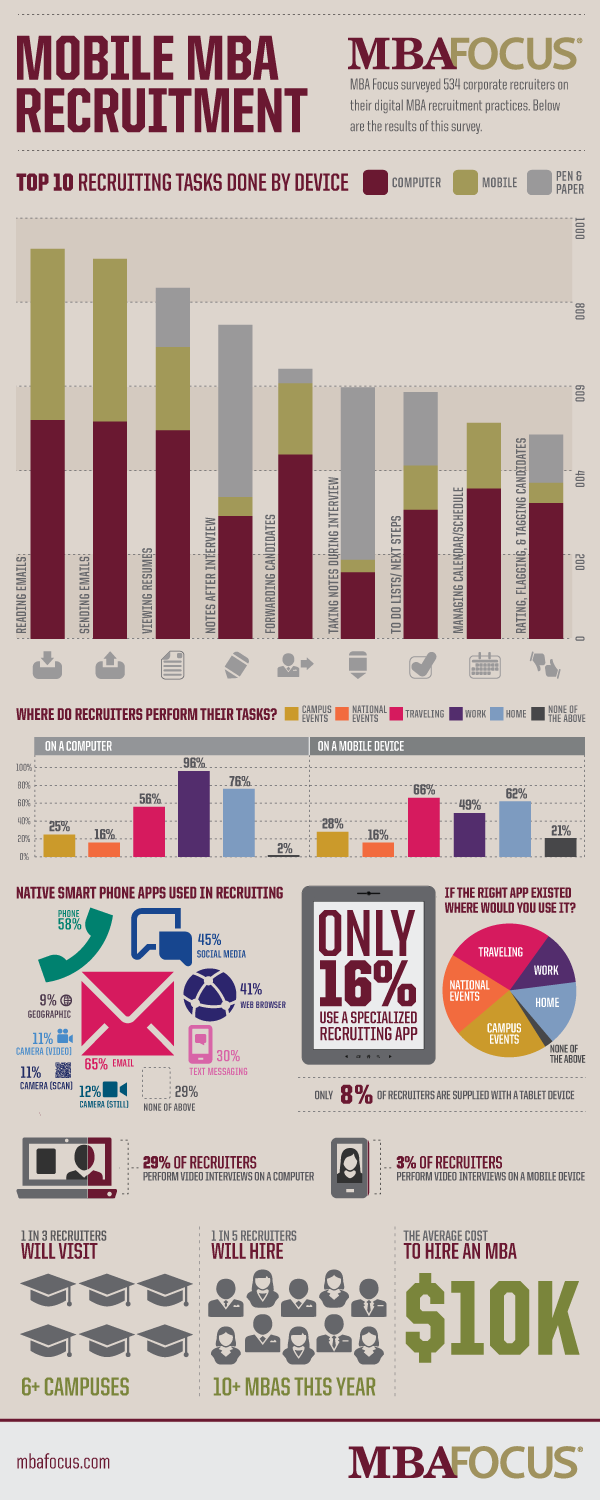
    [INFOGRAPHIC] Recruiters go mobile

    Today, MBA recruiters use a mixture of traditional on-campus, in-person recruitment methods, and new digital recruitment tools to aid them in this complex process. This infographic from MBA Focus, "Digital MBA Recruitment: Top 10 recruiting tasks done by device," gives you a glimpse into how companies are recruiting top MBA talent using their computer, mobile device, and good ole-fashioned pen & paper. It clearly shows that recruiters have not only gone mobile, but also social, as more than 45% of recruiters use social media apps on their smartphone as part of the recruitment process.

    Tuesday, January 22, 2013

    Ten tips to win the Instagram popularity contest


    Instagram is officially the next big thing in social networking. And despite some outrage in late 2012 over changes to its terms of service, Instagram continues to grow. The photo-centric social network now has 90 million monthly active users and sees more than 40 million photos uploaded every day. They also report having more than 8,500 Facebook “Likes” per second making it one of the most popular social networks around. But not everyone or everything on Instagram is "cool".

    After reflecting on those I follow (and unfollow) on Instagram, I've discovered these ten things you can do to get the most likes and the most followers (and avoid the dreaded unfollow) on Instagram:
    1. One At a Time: Don't post more than 1 or 2 photos at a time. This isn't Facebook. It's not a place to publish albums of photos. And there is never any need for 2 photos of the same thing. Pick the best one.
    2. Use Hashtags: The more hashtags you use the better. And seek out some of the "secret" top hashtags. They're like The Skull and Bones, once you join the club you'll become instantly popular.
    3. Don't #TBT: #TBT, also known as, Throw Back Thursday, is one hashtag to avoid. You should only post photos you just recently took on your iPhone or Droid (there's a reason you can't upload from the web). It's supposed to be "instant" hence the name Instagram.
    4. Join the iPhone-Only Club: Expanding on the previous tip, there are a lot of people who believe Instagram should only be photos you took with your iPhone (or Droid or other smartphone) and NOT pictures taken with your digital camera or expensive DSLR. Those photos belong on 500px and Flickr.
    5. This Isn't Pinterest: Instagram is not the social network for sharing memes, inspirational posters, and quotes. That's what Pinterest is for. And don't even get me started on #instanotes.
    6. More Action Photos: Don't just post selfies and pictures of you with your friends smiling for the camera. Take some action photos of people actually doing things other than saying "cheese".
    7. Less Blurry Photos: Do NOT EVER post a blurry photo. Even if you caught Big Foot in a blurry dash through the forest, do not post it! At the same time, don't use the cool little blur tool on every photo. Though there are some cool effects that you can accomplish using this feature (i.e. miniatures), it is greatly overused. 
    8. Less Random: Try and not post random unrelated photos that have nothing to do with previous posts. Create a theme with your photos, whether it be through the content of the photos (i.e. all sunset photos) or the style of the photos (i.e. all close-up shots). 
    9. Foodies Beware: Though it is good to have a theme to your Instagram collection be careful about just posting pictures of your meals. It's become a major cliche and though it could still be acceptable as a restaurant review or recipe sharing service, there are better social media outlets to be doing so (i.e. Yelp).
    10. Share to Twitter: Now that Instagram has revoked the inline previews of photos on Twitter you should be careful what you choose to share via tweets. Having to click-through to instagram.com to see the photos can ruin the experience -- especially if the photo is breaking one of the above 9 rules!
    What other Instagram tips do you have? Leave your best practice suggestions in the comments below.

    Saturday, September 29, 2012

    Top 10 ways to connect with millennials


    If you're looking for a way to connect with the millennial generation, social networks are the best source to find those "kids" and build meaningful relationships with them. Try interacting with them via:
    1. Facebook: With over 1 billion active users and more than 42 million pages with 10 or more likes, Facebook is the perfect place to connect with MBAs. Your company/product/school should have its own Facebook page that millennials can “like” and get daily updates on relevant news and events. By creating an official Facebook page, you can easily reach a self-selected audience who is actually interested in what you have to say.
    2. Twitter: Twitter is a proven marketing tool and an effective outreach device. Many companies have a presence on Twitter. And some even have multiple accounts, including an entire product-oriented presence. Millennials are already using Twitter to communicate, research, promote and personally brand themselves – you should be doing the same for your company's/product's brand. Take a moment each day to tweet about something relevant or interesting.
    3. LinkedIn: Where Facebook is considered a more personal space, LinkedIn has been defined as the “professional” social network. Use LinkedIn to connect with working millennials with money to spend. You should not only create a LinkedIn group for your company's employees, but also create subgroups for each product's users/experts to better connect (and stay connected) with your customers.
    4. Google+: Google+ is the fastest growing social network ever, already with 90+ million users. And it’s critical to Google’s new “social” search algorithm. Create an customer-facing company “page” now and start adding your customers, users and fans to your “circles” (Google+ pages are different than personal accounts in that you can’t add people to your circles until they’ve added you). Once your Google+ page has been created you can advertise it to millennials just like any other social network.
    5. YouTube / Vimeo: Videos are 53 times more likely to appear in search than text webpages. So if you are trying to connect with millennials organically through search, YouTube might just the best way to do so. Need content ideas? Try helpful tips from users or how-to videos for your products.
    6. Blogs: You are probably already blogging, but if not, you should be! A blog is the easiest way to get information on the internet for your audiences to find. And comments on blogs are the easiest way to start a conversation with those audiences. If you don’t already have a blog built into your website, you can start one for free on Blogger or Wordpress. Then start posting any news or commentary that you think millennials might find interesting, relevant and timely. Your company's blog is also a great way to promote your new products to millennials doing research on the web.
    7. Instagram: This photo sharing network is an easy way to post a picture worth 1,000 words. Find the most artistic person with an iPhone or Droid in your office and create an account on Instagram for your company. Post pictures of goings-on around the office, product details, or people using your products to pique interest in your company. Instagram is the new Flickr.
    8. Pinterest: Pinterest is the hot new social network, and it’s dominated by women. Create some boards around “Women", “Fashion”, and “Style” to connect with the female millennials.
    9. Foursquare: Make sure your company is available for “Check Ins” on Foursquare. It’s an easy way for millennials to advertise for you by showing their friends where they've been and leaving tips for future visitors/customers.
    10. Tumblr: It’s the new way to blog. The best Tumblr blogs have a niche theme, so pick something simple like “Our Customers” or the newest internet meme and twist it to something your customers might find interesting or funny.
    For more information on connecting with the millennial generation, please contact me.

    Saturday, June 2, 2012

    Google Wave was the next big thing


    Do you remember Google Wave?


    You probably don't. But Google Wave was supposed to be the next big thing in social networking. So why should we believe that Google+ will be?

    I think the answer is: we shouldn't.

    Despite the stats toting it as "the fastest growing social network ever," Google is merely playing catch-up. At least Google Wave was innovative. It was a totally new concept on sharing and collaborating. Google+ is just a combination of Twitter and Facebook. It's really nothing new. And it fails to help us with any problems or needs that Facebook and Twitter don't already solve.

    So be cautious. The stats are misleading. And largely inflated by Google+'s integration with its new social search algorithm. Google+ may not die as suddenly as Google Wave but it will never be "the next big thing."

    Thursday, April 26, 2012

    25 Twitter Do's and Dont's

    Twitter Commandments

    Unlike Facebook and many other closely monitored social media outlets, Twitter is a lawless community where anyone can post anything. And while some people take advantage of that wild-west-ish world for spam and other unruly or exotic calls-to-action, many of you are just looking for some general guidelines to tweet by and/or tips for growing your network. For those of you that fall into the latter category, here are twenty-five do's and don't for Twitter:

    DON'T...
    1. DON'T Complain about work. 
    2. DON'T Tweet about religion.
    3. DON'T Tweet about politics.
    4. DON'T Be afraid to express your opinions.
    5. DON'T Be too personal or negative.
    6. DON'T Repeatedly post the same link or tweet. 
    7. DON'T Abuse trending topics or hashtags. 
    8. DON'T Over sell your own stuff.
    9. DON'T Over share your own stuff.
    10. DON'T Post more than one #FF per Friday.
    11. DON'T Use corporate rhetoric and jargon.
    12. DON'T Exceed five tweets per day. 
    13. DON'T Post a picture you wouldn't want to see on the front page of the newspaper.
    14. DON'T Post similar messages over multiple accounts.
    15. DON'T Say anything you wouldn’t say to someone’s face or to a TV camera.
    16. DON'T Publicly mention and thank everyone who follows you.
    17. DON'T Follow someone today and unfollow them tomorrow.
    18. DON'T Send automated/scheduled tweets and replies. 
    19. DON'T Just post a URL with no supporting text.
    20. DON'T Follow more than 25 new people at once.
    21. DON'T Follow hundreds of people at once and remove all who don’t follow you back.
    22. DON'T Send a canned direct message whenever someone new follows you or your company.
    23. DON'T Make your account settings private.
    24. DON'T Be guilty of the self-congratulatory retweet.
    25. DON'T Forget to reply to mentions.

    DO...
    1. DO Complete your profile.
    2. DO Add a picture of your face or logo.
    3. DO Have a sense of humor and be funny.
    4. DO Follow hashtags (#) when attending events/webinars.
    5. DO Collect people’s Twitter names just like you do phone numbers and email addresses.
    6. DO Create hashtags (#) for your own events.
    7. DO Promote new tools/resources.
    8. DO Establish yourself as a thought leader in your industry.
    9. DO Follow thought leaders and bloggers in your industry.
    10. DO Follow people your followers are following.
    11. DO Follow people suggested in #FF (Follow Friday) tweets. 
    12. DO Make your Twitter usernames easy to find.
    13. DO Make your tweets useful resources so people need you.
    14. DO Interact with those people you follow who don’t follow you back yet.
    15. DO Use the “Favorites” feature as a list of testimonials.
    16. DO Link to your own resources/articles as well as others.
    17. DO Direct Message people instead of sending them an email.
    18. DO Develop relationships with reporters, bloggers and other media people through Twitter.
    19. DO Respond to concerns people tweet about you, your company or products.
    20. DO Use your company account to update customers as well as prospects.
    21. DO Be sure to follow back everyone who follows your Company Account.
    22. DO Integrate your Twitter efforts with your other marketing initiatives.
    23. DO Follow the celebrities you’d want to be friends with, the newspapers you read, the products you use, the restaurants you eat at, the designers you wear, and the athletes you root for.
    24. DO Tweet at your favorite celebs and people you don't personally know.
    25. DO Follow @RyanPratt ;)
    Mention or direct message me if you have any questions, comments, additions, or concerns.

    Saturday, November 12, 2011

    Stocking up for a tebow plank mob


    C'mon. All the cool people are doing it.

    You're not cool if you haven't taken a picture of yourself laying horizontally, praying, or doing something so normal they use it as a stock photo in a picture frame. And how do you expect to define yourself as an individual and stand out from the masses without taking part in an organized dance in a seemingly unorganized world?

    Okay, I'm being a tad flippant. But it is tempting right? I mean the world is built by bandwagons. Why not jump on? I finally did:
    • Planking: an activity consisting of lying face down in an unusual or incongruous location.
    • Tebowing: a neologism derived from Tebow's propensity for kneeling and praying—even during crucial periods of a football game.
    • Stocking: a participatory photo fad in which people take pictures of themselves recreating scenes from stock photos.
    • Flash Mobbing: a group of people who assemble suddenly in a public place, perform an unusual and sometimes seemingly pointless act for a brief time, then disperse, often for the purposes of entertainment, satire, or artistic expression.
    Now the only question is, what will the next Internet meme be?

    Wednesday, October 5, 2011

    10 things I hate about Twitter


    I hate when someone I follow on Twitter...
    1. Still uses the now-ancient "RT @twitterhandle" to retweet someone instead of just hitting the Retweet button.
    2. Puts a period before an @mention because they want the whole world to see what they're talking about (not just those people who follow both of you).
    3. Makes me click on the link to find out I'm completely uninterested.
    4. Automatically posts every check-in on Foursquare and GetGlue.
    5. Has an entire conversation with a friend on Twitter instead of just texting or calling them.
    6. #humblebrags -- though they are funny when they're unknowingly retweeted by @humblebrag
    7. Has a profile picture of anything other than their own headshot.
    8. Just tweets a link with no supporting text
    9. #pitytweets
    10. Tweet thieves who repost original, funny, or interesting content without mentioning the source.

    Monday, August 22, 2011

    #WelcomeToTwitter Trick


    I just stumbled upon a nifty little Twitter trick for all those marketers out there running multiple Twitter accounts in the same field or industry. You can now create a list of similar Twitter accounts and include #welcometotwitter in the description, and then when someone follows you they will also be recommended to follow the other accounts in your #welcometotwitter list. This is particularly helpful to help you grow a fledgling account if you have a similar account that is more mature and popular.

    Monday, August 1, 2011

    Law & Order: SNU


    I was recently tasked to perform a social network investigation to "find anything damaging on a few litigants in the world of cyberspace." It was an interesting opportunity that I found myself whole-heartedly interested in. But with my limited legal knowledge (watching "Law & Order: SVU") I quickly realized that I could really only advise my client on the social media aspect of the investigation.

    After some initial research, combined with my previous experience on the web and social networks, I believe it would be extremely difficult to find anything of legal significance on any of these "subjects" online. Here's why:

    There are currently over 750 million registered users on Facebook. And more than 200 million on Twitter. And on each of those there are multiple people with the same user-defined name. Even if you know the current location of each person of interest, it still only narrows the field to a user-defined list of people in or around the area. There are some lat/long GPS check-in social networks, but they are far less popular. Foursquare has 10 million registered users.

    Then if you actually find the correct person, it would be very rare that you find anything of substance to use in a legal case of this matter (i.e. someone tweeting: "I am stealing a bunch of money from my doctor LOL"). Occasionally, with some criminal lawsuits (i.e. the recent riots and looting in London) people are dumb enough to post something that could be used as evidence in a court of law (i.e. looters in London posting pictures of what they stole). But in these cases the best you might do is find a person to be greedy (i.e. "just bought a new Porsche I can't afford"), with poor ethical standards ("bitches ain't shit but hoes and tricks"), or maybe, if you are lucky, admitting to use of drugs ("I am so stoned right now"). Only a complete moron would tweet, post, or check-in to a place and state that they are doing something illegal - but then again there were those London looters?